Saturday, 7 February 2009

The first conference of the year

So after a traumatic journey to get the the Eurostar terminal at St. Pancras in London through the most snow we've seen in 20 years around my hometown, I finally arrived in Brussels with Greg for FOSDEM. After settling in to our hotel rooms, we met up with some of the usual suspects and wandered off to our planned dinner at Restobieres where we had a bunch of different beers, and dinner. Various other people joined us throughout the evening, including Magnus and Selena who met in Amsterdam and took the train here.

Which leads me to the point of the post. Well, as much of it as I can remember. After dinner a small group of us decided to go to Cafe Delirium where the FOSDEM beer night was being held. For reasons that now escape me, but were related in some way to us not knowing where on earth we were going, I promised to blame Selena for the fact that we had to follow a MySQL guy (yeah, I know, I know) to the square by the Cafe.

So, whatever the problem was at the time - Selena; it's all you fault.

There - don't say I don't keep a promise :-p

And now, breakfast, and off to day 1 of FOSDEM.

Wednesday, 4 February 2009

pgAdmin - change of licence

Effective from the 26th February 2009, the pgAdmin Development Team intend to change the licence of pgAdmin III from the Artistic Licence v1.0 to the Artistic Licence v2.0 (http://www.opensource.org/licenses/artistic-license-2.0.php)

The change of licence is in response to criticism of its wording from the Free Software Foundation ("too vague; some passages are too clever for their own good, and their meaning is not clear."), as well as issues raised during legal proceedings in the US.

The licence change will apply to future releases of pgAdmin III; both official versions and updates released with PostgreSQL installers. Existing users may, at their option, use older versions under the terms of the new licence.

If you have contributed to the pgAdmin III project in the past and have any questions or objections regarding the intended licence change, please contact me immediately at dpage (at) pgadmin (dot) org.

Friday, 2 January 2009

PostgreSQL Early Experience Installers

Hot on the heels of Devrim's Snapshot RPMs, I'm pleased to say we now have 'early experience' one-click installers available to download and play with the latest features committed to the PostgreSQL and pgAdmin source trees. We're aiming to update the installers periodically after interesting features are added - the first of which is Hitoshi Harada's SQL:2008 Window Functions patch for PostgreSQL.

You can download the installers for Linux 32 and 64 bit, Mac OS X 10.4+ and Windows.

Note that as development builds, these packages have had very little testing and should not be used on production systems.

Tuesday, 16 December 2008

PostgreSQL management on the iPhone

Back in the summer Bob Zurek (CTO at EnterpriseDB) persuaded me to spend some time on a simple iPhone application for remote administration of PostgreSQL and Postgres Plus. I decided to write it as a web app as I didn't really have the spare time to learn Objective-C to the level required and besides, there are certain advantages to handling most of the processing server-side - for example, paging of large result sets from arbitrary user queries can be made more efficient. As is often the way, other projects took over and it fell by the wayside despite being more or less complete, but I finally managed to find the spare cycles to get Sachin from our installer team to package it up (thanks Sachin) - and I'm pleased to say that as of today it's finally available through StackBuilder for those of you with an iPhone or iPod touch.

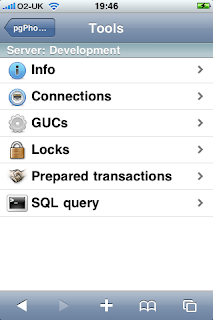
So, what does it do? Not a massive amount admittedly - it's designed primarily for emergency maintenance (and frankly, who wants to do their day to day work on a phone?), but as can be seen from the main menu there are options to view server info, connections, GUC variables, locks, prepared transactions, and the ability to run arbitrary SQL queries.
The Info tool for example, displays various details of the server you're connected to. The installer will setup a connection to the local server, but you can add as many more as you like:


Probably the most useful feature is the ability to run arbitrary SQL queries. Batches of rows are summarised in a list, with the usual option at the end to get fetch the next batch. Selecting a row will display the complete set of values - the screenshot below captures the row details sliding across the display from the right:

If you want to have a go, just select the pgPhoneHome download in StackBuilder.

Oh... and while I think of it, we also updated the installer for the PostgreSQL JDBC driver to v8.3-604 at the same time.

Enjoy :-)

Friday, 5 December 2008

StackBuilder application updates

I've just published a number of updates to various StackBuilder applications (if you're not sure what Stackbuilder is, see my previous blog post which included a brief description). The updates available are:
  • ApachePHP has been updated to Apache v2.2.10 & PHP v5.2.6 (Linux 32/64 bit, OS X and Windows).
  • Drupal has been updated to v6.6 (Linux 32/64 bit, OS X and Windows).
  • mediaWiki has been updated to 1.13.2 (Windows).
  • psqlODBC has been updated to 08.03.0400 (Linux 32/64 bit, OS X and Windows).
  • EnterpriseDB Tuning Wizard has been updated to 1.2 (Linux 32/64 bit and OS X).
So, fire up StackBuilder and start downloading those updates!

Thursday, 4 December 2008

Going mobile with a Linux netbook

A friend of mine bought a Linux based Acer Aspire One netbook, and asked me to help get it working with her Three (a UK 3G network) mobile broadband dongle. It's not entirely straightforward to figure out, but is pretty easy once you know how.

Initial setup


- Click on Settings and run the Aspire's Live Update program to update the operating system with the latest patches. Reboot when prompted. Keep doing this until Live Update reports that all updates have been installed.


- Shutdown the Aspire, and plug in the Three modem.


- Boot the Aspire, and select the Mobile Partner app on the Connect tab.


- Wait for Mobile Partner to detect the modem.


- Select Tools -> Options, and the click the New button.


- Give the profile a name, such as 'Three mobile broadband' and configure the following options:


  APN type: Static

  APN name: three.co.uk

  Access number: *99#

  Username: three

  Password: three

  Protocol: chap


- Save the profile.


Daily use


- Boot the Aspire, and plug in the modem. If a file browser window opens, close it.


- Run the Mobile Partner app on the Connect tab.


- Wait for Mobile Partner to detect the modem.


- Click the Connect button.


- When Mobile Partner has connected, minimise (don't close) it, fire up the web browser and away you go!


And what's the PostgreSQL angle you might ask? There isn't one. Sorry.


Monday, 17 November 2008

More StackBuilder apps available for Linux & Mac

If you've ever used PostgreSQL 8.3 on Windows, you'll be aware of StackBuilder, the package management tool that's included for downloading and installing additional tools, drivers and applications to work with PostgreSQL. Designed to be really easy to use, you simply run StackBuilder, choose the applications you wish to install (any dependencies will be automatically installed as well), and it will download them and set them up to work with your PostgreSQL installation.
With the release of PostgreSQL 8.3.5 a few of weeks ago, we (the excellent team I work with at EnterpriseDB) added Linux and Mac ports of StackBuilder to the PostgreSQL 'one click' installers that we maintain, and as of Friday have an almost identical set of applications available via StackBuilder on Windows, Mac and Linux (32 and 64 bit).

So, currently available for all four platforms, we have:
  • PostgreSQL 8.3.5
  • psqlODBC
  • pgJDBC
  • PostGIS
  • Slony
  • Apache + PHP
  • Drupal*
  • mediaWiki
  • phpBB
  • phpPgAdmin
  • phpWiki
In addition, we also published our own Tuning Wizard and MySQL Migration Wizard apps. We're working on additional updates and new apps all the time, so fire up StackBuilder regularly to check for new packages.

* Note: The Drupal release for 64 bit Linux has been delayed due to a last minute issue found during testing.