Back in the summer Bob Zurek (CTO at EnterpriseDB) persuaded me to spend some time on a simple iPhone application for remote administration of PostgreSQL and Postgres Plus. I decided to write it as a web app as I didn't really have the spare time to learn Objective-C to the level required and besides, there are certain advantages to handling most of the processing server-side - for example, paging of large result sets from arbitrary user queries can be made more efficient. As is often the way, other projects took over and it fell by the wayside despite being more or less complete, but I finally managed to find the spare cycles to get Sachin from our installer team to package it up (thanks Sachin) - and I'm pleased to say that as of today it's finally available through StackBuilder for those of you with an iPhone or iPod touch.
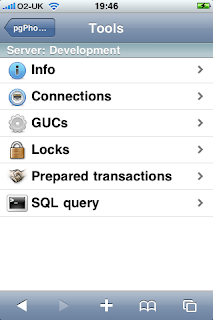
So, what does it do? Not a massive amount admittedly - it's designed primarily for emergency maintenance (and frankly, who wants to do their day to day work on a phone?), but as can be seen from the main menu there are options to view server info, connections, GUC variables, locks, prepared transactions, and the ability to run arbitrary SQL queries.
The Info tool for example, displays various details of the server you're connected to. The installer will setup a connection to the local server, but you can add as many more as you like:
Probably the most useful feature is the ability to run arbitrary SQL queries. Batches of rows are summarised in a list, with the usual option at the end to get fetch the next batch. Selecting a row will display the complete set of values - the screenshot below captures the row details sliding across the display from the right:
If you want to have a go, just select the pgPhoneHome download in StackBuilder.
Oh... and while I think of it, we also updated the installer for the PostgreSQL JDBC driver to v8.3-604 at the same time.
Enjoy :-)


